Case IH FieldOps vs EST vs Remote Service Tool: What Each Diagnostic Tool Actually Does
Case IH owners now have several digital tools that can provide information when a machine develops a problem, but FieldOps, Electronic Service Tool and Remote Service Tool do not provide the same level of access.
FieldOps monitors the connected machine and provides operating context. EST connects directly to the machine’s CAN network for diagnostic work. Remote Service Tool extends selected EST functions to supported connected machines through the modem.
Understanding those differences helps determine which tool is useful at each stage of troubleshooting.
Case IH FieldOps
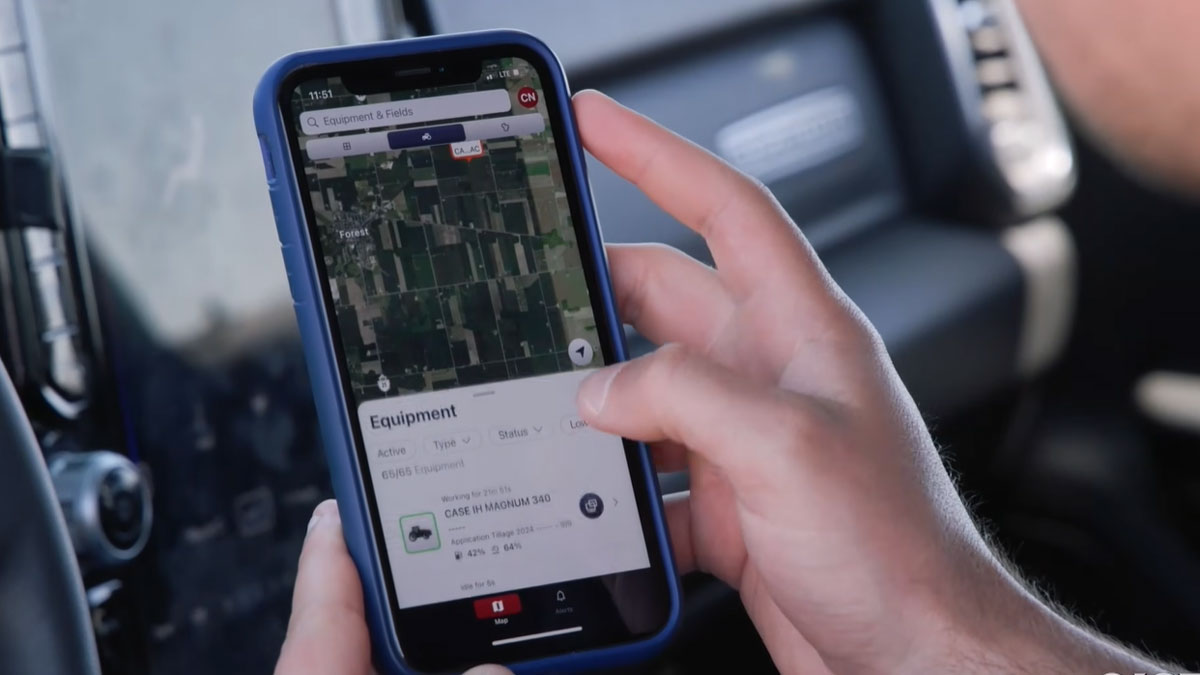
FieldOps is the owner-facing connected-machine platform.
It brings machine location, status, performance information, machine health and agronomic information into a web and mobile interface. Case IH also integrates the platform with Connected Services, including proactive service alerts and remote support.
For diagnostics, FieldOps is primarily useful for context.
If a warning occurs while a tractor, combine or sprayer is working, FieldOps may provide information about the machine and its operating conditions without requiring a diagnostic computer to be physically connected.
That is useful when answering questions such as:
- When did the problem occur?
- Is the machine still operating?
- Are there related machine alerts?
- Has the condition occurred repeatedly?
- What was the machine doing around the time of the problem?
FieldOps can help establish the circumstances surrounding a fault, but it is not a replacement for EST.
Remote Display View
Remote Display View is another FieldOps and Connected Services function that can help during troubleshooting.
It allows a remote user to see the compatible Pro 1200 display that the operator sees in the cab.
This can help with warnings, settings and configuration problems because the operator does not have to describe every screen over the phone.
A dealer or support person can see the display and guide the operator through the appropriate checks.
Remote Display View does not provide the same access as connecting diagnostic software to the machine’s controllers.
It is essentially a way to remotely see what is happening at the operator interface.
Electronic Service Tool
EST is the diagnostic tool.
Instead of displaying selected machine information through a fleet-management interface, EST connects a Windows PC to the Case IH machine’s CAN network through a protocol adapter.
Case IH says EST provides controller status and version information, parameter monitoring, fault-code retrieval and clearing, service manuals, electrical and hydraulic schematics, fault descriptions and repair procedures.
This makes EST appropriate when troubleshooting moves from:
“What warning is the operator seeing?”
to:
“Why is the controller generating this fault?”
That distinction is important.
FieldOps can provide information surrounding a machine problem. EST provides access needed to investigate the machine’s electronic systems directly.
Remote Service Tool
Remote Service Tool sits between connected-machine support and conventional EST diagnostics.
Case IH describes RST as an extension of EST that allows technicians to perform supported diagnostic functions remotely through the modem installed on a connected machine.
Supported functions:
- retrieving and clearing fault codes;
- reading and updating machine configurations;
- collecting CAN bus parameters over time;
- remotely pushing software updates.
This means a technician does not necessarily need to be standing beside the tractor with a diagnostic adapter to perform every initial diagnostic task.
Some information can be collected before a service visit.
Why CAN Parameter Logging Matters
The ability to collect CAN parameters over time is useful for intermittent faults.
Consider a tractor that generates a fault only after several hours of heavy work.
When the technician arrives the following morning, the machine may operate normally. Connecting EST at that point may not immediately reproduce the condition.
Logging selected parameters over time can provide information from the period when the fault actually occurs.
This can be useful when investigating problems associated with temperature, pressure, voltage, engine load or another operating condition that changes while the machine is working.
It does not automatically identify the failed component, but it can help narrow the diagnostic path.
Proactive Support Alerts Add Another Layer
Case IH also provides Proactive Support Alerts through its connected service infrastructure.
The company says its eTIM and Top Connect system allows dealers to monitor machine alerts, identify maintenance opportunities before interruptions and access machine data for performance analysis.
Case IH currently lists Proactive Support Alerts for Steiger, Magnum, Optum and AFS Connect Puma tractors, as well as Patriot 50 Series sprayers.
This differs from an owner manually looking up a fault after a warning appears.
A connected dealer relationship can allow certain machine conditions to be identified remotely and addressed before they result in a longer interruption.
Which Tool Should You Use?
The correct tool depends on what stage of diagnosis you have reached.
Use FieldOps when you need machine status, operating information, alerts or connected support.
Use Remote Display View when the problem involves something the operator is seeing or configuring on the in-cab display.
Use EST when you need controller information, fault retrieval and clearing, live parameters, schematics or a diagnostic procedure.
Use Remote Service Tool when supported EST functions need to be performed remotely on a connected machine.
These tools overlap in some areas, but they are not interchangeable.
Example: Diagnosing an Intermittent Sensor Fault
Suppose a Case IH tractor generates a sensor-related fault during field work.
The operator can first identify the code and determine which system reported the problem.
FieldOps may provide additional information about the machine’s operating conditions.
If dealer assistance is required, connected support can provide further information remotely.
EST can then be used to retrieve the fault and monitor the relevant controller parameters.
If the sensor value appears incorrect, the technician can use the electrical schematic and diagnostic procedure to check the sensor circuit.
Physical testing may reveal that the sensor is functioning correctly but its 5V reference supply is missing because of a wiring problem.
In that case, replacing the sensor would not repair the machine.
The digital tools help narrow the investigation, while conventional electrical testing identifies the actual cause.
FieldOps, EST and RST Serve Different Jobs
The easiest way to understand the Case IH diagnostic ecosystem is to separate the tools by function.
FieldOps = monitor and understand the machine remotely.
EST = diagnose the machine through its CAN network.
RST = perform supported EST diagnostic functions remotely.
Remote Display View = see what the operator sees.
Proactive Support Alerts = allow supported connected-machine issues to reach the dealer service workflow.
None of these eliminates the need for fault-code interpretation, service information or physical testing.
Together, however, they provide several layers of information that can be used before a component is replaced.
For Case IH owners and technicians, knowing which layer to use is often the first step toward diagnosing the fault efficiently.