Official Case IH and CNH Apps That Are Actually Useful for Diagnostics and Service
CNH offers mobile apps for equipment monitoring, parts support, construction machinery and other services. For Case IH owners and technicians, only some of these tools are relevant to agricultural equipment diagnostics and repair.
The most useful applications fall into two areas: getting information from a connected machine when a problem occurs, and identifying the correct parts once troubleshooting has found the cause.
This guide covers the official CNH apps that can help with those tasks, along with several apps that Case IH owners may encounter but generally do not need.
Case IH FieldOps
Best for machine monitoring, alerts, remote support and troubleshooting context.
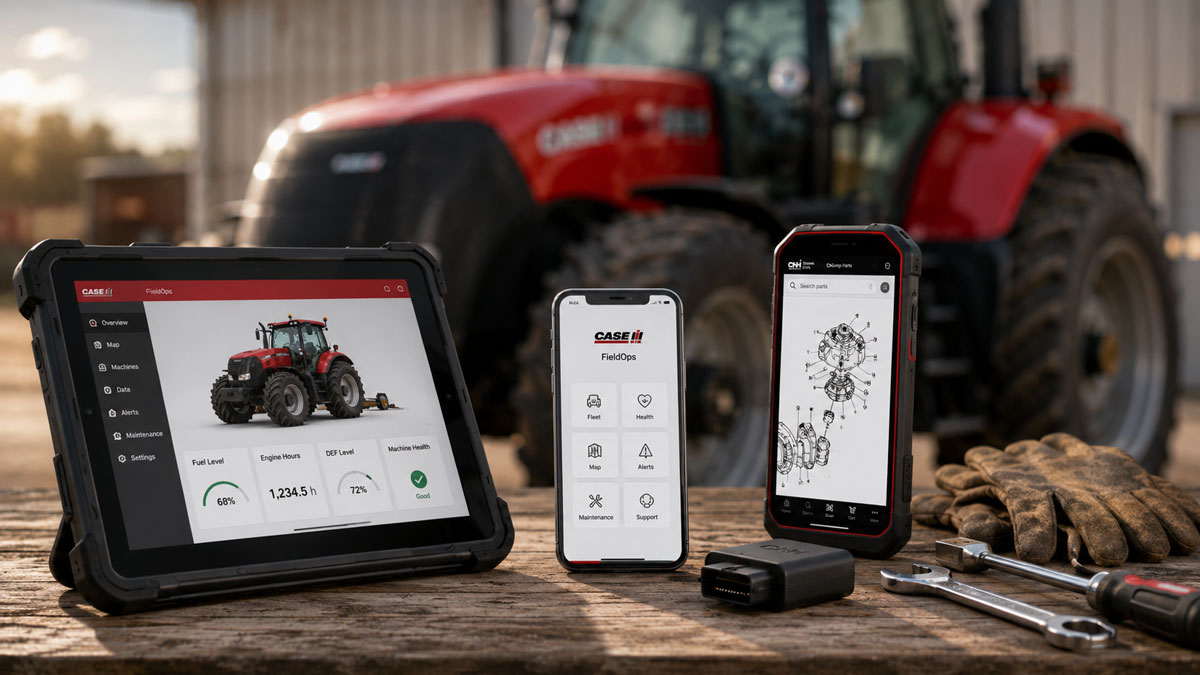
Case IH FieldOps is the main connected-machine platform for current Case IH agricultural equipment. It can be accessed through mobile devices and the web, with available functions depending on the machine, connectivity hardware and account configuration.
FieldOps brings machine and agronomic information into one platform. For service work, the relevant functions include machine status, operating information, alerts, machine health information and remote support.
This can be useful when a fault occurs because the fault code itself is only one part of the diagnostic picture.
A controller may report an engine, transmission, hydraulic or electrical fault, but the technician still needs to determine what caused it. Knowing when the problem occurred, whether it repeats and what the machine was doing at the time can help narrow the investigation.
How FieldOps Can Help With Troubleshooting
Consider a tractor that intermittently displays a transmission warning while working but operates normally after it is restarted.
The fault code identifies the system and detected condition. The next step is determining the circumstances surrounding the fault.
Available machine information may help establish whether the warning occurred under load, whether other alerts appeared at the same time and whether the problem has been repeated.
That information can help a technician decide what to inspect first before beginning physical testing.
FieldOps can therefore be useful with intermittent problems that are difficult to reproduce in the workshop.
Remote Display Viewing
Remote Display Viewing allows authorized support personnel to see the display of compatible Case IH equipment remotely.
This is useful when the operator is dealing with a warning, configuration problem or unfamiliar display behavior.
Instead of describing screens and menu options over the phone, the operator can allow the support technician to see what is happening on the display.
This is relevant for problems involving settings, guidance configuration, machine setup and some warning conditions.
A remote session may show that the problem can be corrected through configuration. If the warning indicates a hardware problem, the technician at least has more information before traveling to the machine.
What FieldOps Cannot Do
FieldOps should not be treated as a replacement for Case IH dealer diagnostic equipment or the appropriate service manual.
Access to machine information does not mean that every controller can be programmed, calibrated or tested through FieldOps.
Many fault codes still require physical diagnostic work.
An electrical fault may require checking supply voltage, ground, continuity, CAN communication or sensor signals. Hydraulic faults may require pressure testing. Mechanical problems still require inspection of the affected components.
FieldOps provides information that can help determine where troubleshooting should begin.
CNH Genuine Parts Scanner
Best for parts identification during maintenance and repair.
Finding the cause of a fault and identifying the replacement part are separate tasks.
A diagnostic procedure may lead to a sensor, valve, switch, filter or another component that needs inspection or replacement. The technician then needs to determine which part is fitted to that particular machine.
Model name alone may not always be sufficient.
Component specifications can change by serial number, production period, market or machine configuration. Similar Case IH machines may therefore use different versions of a component.
CNH Genuine Parts Scanner is intended for the parts side of this process.
For CaseIHFaultCodes.com users, it makes the most sense after the diagnostic work has already identified the component that needs attention.
Where the Parts Scanner Fits
A typical troubleshooting process could look like this: Fault code → affected controller or system → possible causes → testing → failed component → parts identification → repair.
The Genuine Parts Scanner belongs toward the end of that sequence.
It does not explain why a transmission controller generated a particular fault code or determine whether a pressure sensor has failed.
Those questions need to be answered first.
Once the technician has identified the component involved, an official parts tool can help with the next stage of the repair.
This distinction is important because replacing the component named in a fault description without testing it first is poor diagnostic practice.
A sensor-related fault, for example, may be caused by the sensor itself, but it can also result from damaged wiring, connector problems, loss of reference voltage or a poor ground.
Identify the cause first. Identify the replacement part second.
CASE Site Manager
Best for: CASE Construction equipment, not Case IH agricultural machines.
CASE Site Manager can appear alongside other CNH applications, but it belongs to the CASE Construction side of the company.
CASE Construction and Case IH are separate CNH brands.
The similar names can cause confusion when searching an app store for Case IH tools, but an application carrying the CASE name is not automatically intended for Case IH tractors, combines or sprayers.
Case IH owners looking for agricultural machine diagnostics or connected support should not treat CASE Site Manager as an alternative to FieldOps.
myCASEConstruction
Best for CASE Construction customers.
myCASEConstruction is another CNH application aimed at construction equipment rather than Case IH agriculture.
It is relevant to owners and operators of CASE Construction machines, but it is not a Case IH tractor or combine diagnostic application.
For Case IH owners, there is generally no reason to install it for service or fault-code troubleshooting.
CNH Industrial ConnecTech
Best for specialized CNH connected-service applications.
CNH also uses the ConnecTech name for connected technology and support applications.
These tools should be evaluated according to the specific equipment and service environment in which they are used. They are not a substitute for FieldOps simply because both involve connected equipment.
For an owner of a compatible Case IH tractor, combine, sprayer or other agricultural machine, FieldOps is the more relevant platform for accessing owner-facing connected machine information.
Dealer and professional service environments may use additional CNH systems that are not intended to serve the same purpose.
Which Case IH App Is Most Useful When a Fault Code Appears?
For compatible connected Case IH equipment, FieldOps is the first application worth checking.
Suppose a Case IH tractor displays an engine fault code.
The fault-code description may identify a problem involving fuel pressure, temperature, emissions equipment, a sensor circuit or another monitored condition.
Before replacing anything, the technician needs more information.
Useful questions:
- Is the fault currently active or intermittent?
- Does it return immediately after clearing or restarting?
- Does it occur only under load?
- Were other warnings present at the same time?
- Has machine performance changed?
- Did the operator notice anything unusual before the warning appeared?
Machine information and remote support can help answer some of these questions.
The technician can then move to the appropriate physical tests.
If testing confirms that a component needs replacement, the parts system becomes relevant.
This is why FieldOps and the Genuine Parts Scanner should not be viewed as competing diagnostic applications. They address different stages of the service process.
Do Not Replace Parts Based on the Fault Code Alone
This is especially important with electronic fault codes.
If a Case IH controller reports a sensor circuit problem, replacing the sensor immediately may not solve anything.
The same fault may be caused by:
- an open circuit;
- a short to ground;
- a short to voltage;
- damaged connector terminals;
- corrosion;
- loss of 5V reference voltage;
- poor ground;
- damaged wiring;
- CAN communication problems;
- or the sensor itself.
The same principle applies to hydraulic and emissions systems.
A pressure-related code does not automatically prove that the pressure sensor is defective. A DEF/SCR warning does not automatically identify which aftertreatment component caused the problem.
Apps can provide information, but the fault still needs to be diagnosed.
A Practical Digital Setup for Case IH Owners
There is no need to install every application published by CNH.
For most Case IH owners, a useful digital service setup consists of three parts.
First, use Case IH FieldOps if the machine supports it. This provides connected machine information, alerts and access to remote support functions.
Second, use a reliable Case IH fault-code reference to identify the controller, fault description and possible causes when a code appears.
Third, use official CNH parts resources after testing has identified the component that requires repair or replacement.
The service manual remains necessary when the procedure calls for specific measurements, connector pinouts, calibration steps, pressure specifications, torque values or other machine-specific information.
Older Case IH Equipment Is Different
FieldOps is most relevant to equipment equipped for CNH’s connected services. Owners of older Case IH tractors and combines should not expect the same level of remote machine information.
That does not make digital tools useless for older equipment.
Fault-code databases, parts information, service documentation and basic diagnostic tools remain useful, but troubleshooting is more dependent on information obtained directly from the machine.
For electrical problems, that may mean voltage and resistance measurements.
For hydraulic problems, it may mean pressure testing.
For engine problems, the technician may need to compare sensor readings, inspect fuel delivery or check mechanical condition.
The appropriate diagnostic process depends on the machine generation and the system reporting the fault.
Official Does Not Always Mean Relevant
Seeing CNH Industrial listed as the developer is not enough to determine whether an app is useful for a Case IH tractor or combine.
CNH operates several equipment brands and develops software for different customers, equipment categories and business functions.
Before installing an application for service purposes, check three things:
- Which CNH brand the app supports.
- Which machines or equipment generations are compatible.
- Whether the app is intended for owners, technicians, dealers or another type of user.
For Case IH agricultural equipment, FieldOps is the main application to investigate first when connected machine information is required.
Parts applications become useful when the job progresses from diagnosis to repair.
CASE Construction applications serve a different equipment family and should not be confused with Case IH service tools.